Introduction
When it is time to retire, recycle, or re-purpose corporate IT assets, simply deleting files or formatting hard drives is not enough. The data footprint left behind on laptops, servers, and external drives can pose a massive security risk to businesses. From confidential financial records and employee data to proprietary intellectual property, falling into the wrong hands can result in severe legal, financial, and reputational damage. Understanding the necessity of proper secure data wiping is critical for modern enterprise security.
1. Why Deleting Files Is Not the Same as Secure Wiping
When you delete a file and empty the Recycle Bin on a traditional operating system, the data itself is not erased. The file system simply removes the pointer to the file, marking that space on the storage drive as “available” for new data. Until the operating system eventually overwrites that specific physical location with new files, the original data remains completely intact and can be easily retrieved using freely available data recovery software.
Similarly, a standard “Quick Format” of a drive only overwrites the master file table (the index), leaving the underlying data perfectly readable to anyone with basic technical knowledge. True data erasure requires actively overwriting every single sector of the drive with random patterns or zeros.
2. Risks of Improperly Disposing of Storage Devices
The failure to properly sanitize data storage media before disposal exposes organizations to significant risks:
- Data Breaches: Used hard drives bought online frequently contain highly sensitive corporate data, medical records, and financial credentials that were improperly wiped.
- Regulatory Non-Compliance: Depending on the industry and region, businesses may be subject to strict data protection regulations. Failing to provably destroy sensitive data can result in massive fines and legal action.
- Intellectual Property Theft: Competitors or malicious actors acquiring retired corporate laptops can gain access to trade secrets, source code, or internal communications.
- Reputational Damage: A public data breach originating from discarded hardware can permanently damage customer trust.
3. HDD vs SSD Data Sanitisation Considerations
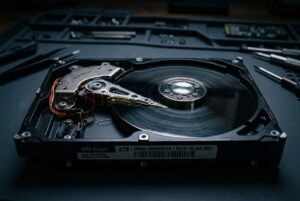
The technology behind the storage device fundamentally changes how it must be wiped. Techniques that work perfectly for older mechanical Hard Disk Drives (HDDs) are highly ineffective for Solid State Drives (SSDs).
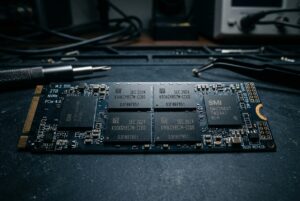
On an HDD, specialized software can systematically overwrite every physical sector on the magnetic platter. However, SSDs use complex wear-leveling algorithms that constantly move data around in the background to prevent memory chip degradation. Because the SSD controller hides the physical location of data from the operating system, standard overwrite software cannot guarantee that every memory cell has been wiped. Proper data sanitisation for SSDs requires using cryptographic erasure or issuing manufacturer-specific secure erase commands directly to the drive firmware.
4. Data Wiping vs Physical Destruction
There are two primary methods for ensuring data cannot be recovered from retired hardware:
- Cryptographic and Software Erasure: Using specialized, certified software to systematically overwrite the entire drive, or securely deleting the cryptographic key on hardware-encrypted drives. This is ideal when the business intends to resell, donate, or re-purpose the hardware, as the drive remains fully functional.
- Physical Destruction: Using industrial shredders or degaussers (for magnetic media) to physically obliterate the device. This provides absolute certainty but permanently destroys the hardware, eliminating any resale value and contributing to e-waste.
The correct method depends on the organization’s security policies, the sensitivity of the data, and environmental considerations.
5. Maintaining a Secure Data Sanitisation Process
A secure IT asset disposition (ITAD) strategy requires a verifiable and consistent process:
- Chain of Custody: Tracking exactly where a device is, who is responsible for it, and when it was decommissioned.
- Certified Methods: Using wiping protocols that meet recognized industry standards (such as overwriting multiple passes with verified patterns).
- Verification: Auditing the wiped drives to confirm that zero readable data remains.
6. Documentation and Internal Records
If a data breach occurs, or if your organization is audited, you must be able to prove that a specific device was securely wiped. A proper data sanitisation process must generate a tamper-proof Certificate of Erasure for every single hard drive or SSD processed. This document should include the drive’s serial number, the wiping standard used, the timestamp, and the technician’s verification, providing a vital audit trail for compliance purposes.
7. When Businesses Should Consider Professional Assistance
Managing data destruction in-house can be highly risky. It requires maintaining specialized software licenses, training staff on the differences between HDD and SSD architectures, and dedicating significant labor hours to monitoring multi-pass wiping processes. For organizations dealing with large volumes of retired hardware or highly sensitive information, partnering with a B2B data security specialist provides peace of mind, verifiable certification, and strict adherence to technical best practices.
8. Frequently Asked Questions
Does drilling a hole through a hard drive destroy the data?
It destroys the platter in that specific spot, preventing the drive from ever spinning up again. However, sophisticated cleanroom forensics could theoretically recover fragments of data from the intact portions of the platter. For absolute security, shredding or certified software wiping is required.
Can a wiped drive be used again?
Yes. If a drive is sanitized using certified software overwrite methods or cryptographic erasure, the hardware itself remains completely intact and functional, making it safe for reuse or resale.
Is a factory reset on a laptop enough?
Generally, no. A standard operating system reset often just formats the drive and reinstalls the OS, leaving the unallocated space full of recoverable legacy data. A dedicated wipe of the free space is required.
9. Conclusion
As businesses generate and store increasingly massive amounts of sensitive data, the secure retirement of IT assets is just as critical as network security. Relying on simple deletion or formatting leaves organizations highly vulnerable to data breaches. By implementing rigorous data sanitisation protocols and understanding the technical differences between modern storage media, businesses can protect their intellectual property, comply with data regulations, and safeguard their reputation.